


Table of Contents
- What is Sigsync Office 365 email signature manager?
- How to start with Sigsync?
- Interface
- Ease-of-Use
- Signature Editor and Design
- Rules and Logic
- Preferences
- User manual, FAQ and Knowledge Base
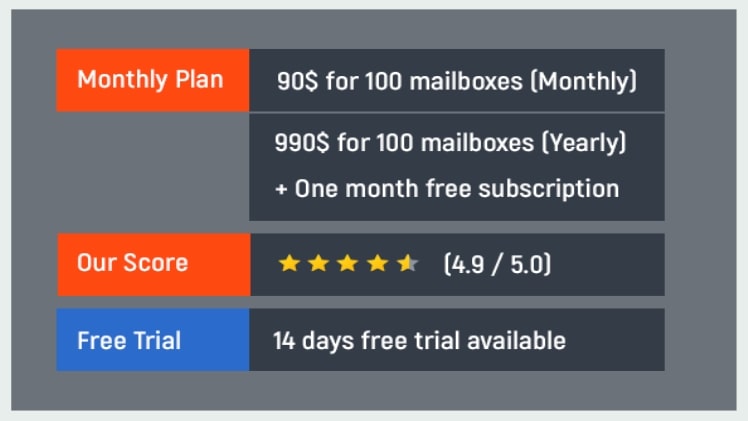
- Product Quality Score
- Main Features
- List of Benefits
- Technical Specifications
- System Requirements
- 24/7 Customer Support and Free live demo
- Pricing Plans
- Security
- Free Signature Design
- Final Verdict
What is Sigsync Office 365 email signature manager?
For adding email signatures and disclaimers to Exchange and Office 365 accounts, Sigsync is the best professional Office 365 email signature. It is a Microsoft preferred and approved solution. You can use it to manage email signatures centrally from a single interface, ensuring that your organization’s signatures are consistent and professional (company-wide). It’s a cloud-based service that doesn’t require any desktop software installations or other permissions, so you can use it from anywhere, whether you’re on vacation, at work, or at home. Continue reading to learn more about this service and to read a comprehensive review.

How to start with Sigsync?
It’s fairly simple to get started with Sigsync. You can access the dashboard using an Office 365 account or by creating a Sigsync account. It provides a 14-day free trial version after you sign up for the service. There are no credit card or other payment details required to try out the service, which is extremely beneficial if you want to try out and explore all of its features.
a. Interface
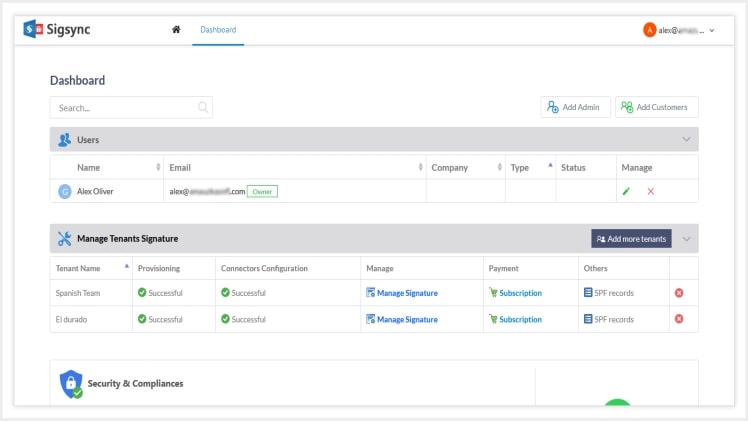
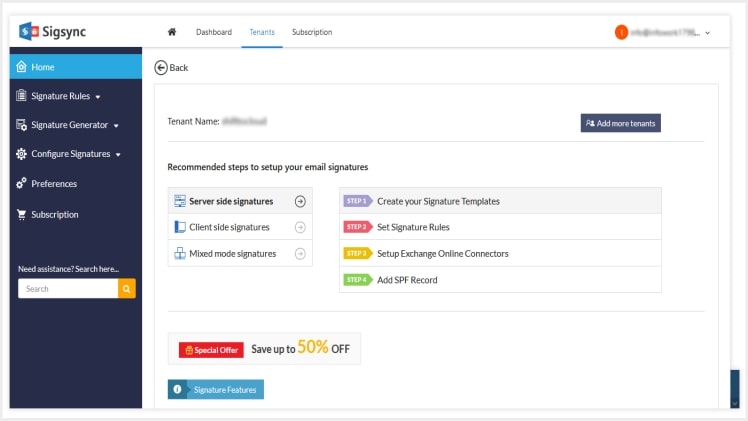
In terms of user interface, Sigsync has a well-designed dashboard with all of the necessary options for configuring email signatures. You can add an Office 365 tenant from the dashboard, and the steps are simple and straightforward. It should be noted, however, that you do not need an Office 365 account to access the main interface of Sigsync. However, in order to add a tenant and configure signatures for it, you must have an active Office 365 account.
b. Ease-of-Use
The simplicity of Sigsync stems from the fact that there is nothing to install or configure. It is compatible with all devices as long as you have a modern web browser installed. There are also no permissions to accept or complicated installation procedures to complete, eliminating bloatware tools that are typically included with desktop installations. You only need to remember your username and password to access the service, which gives you complete flexibility to access it from anywhere.
c. Signature Editor and Design
When it came to the other features, we couldn’t leave out Sigsync’s Signature Editor and Free Signature Design. The feature-rich editor is worth mentioning because it allows you to drag and drop the required components and play around as much as you want. Here, you can really put your design skills to the test, create the perfect signature, and add a feather to your cap. The editor is completely adaptable and has a plethora of elements available to make your signature design stand out.
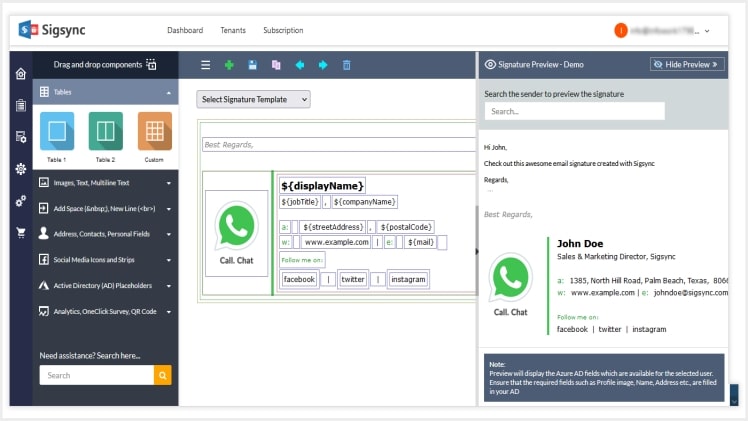
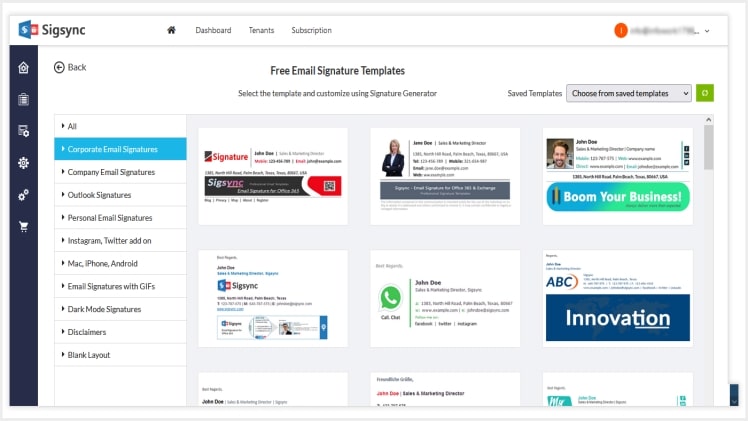
If you want to save time, you can use Sigsync’s free signature templates from the gallery, which are suitable for any occasion.
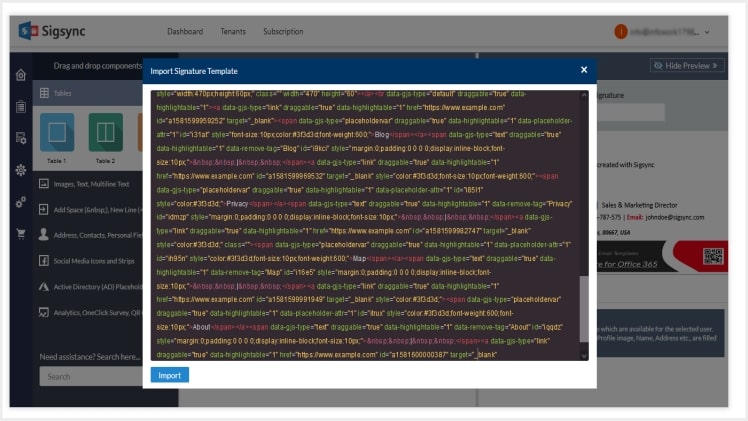
If you want to try a different method, you can import an HTML signature code into the editor, make changes to it, and presto, you have a completely new design.
d. Rules and Logic
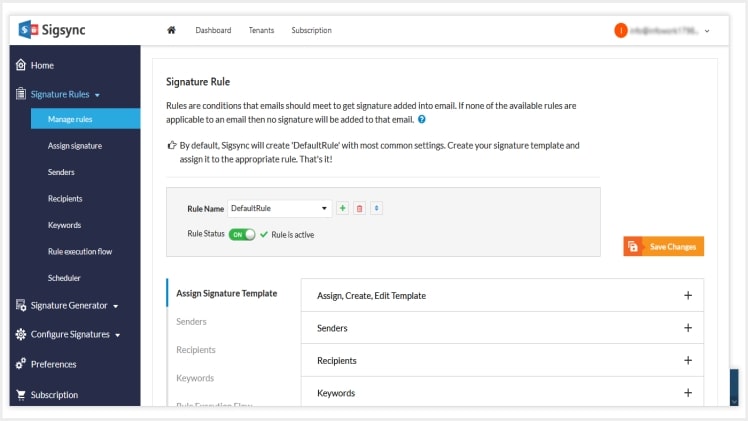
One of the most important features of Sigsync is the different rules available to customize adding signatures. It can therefore be called a rule-based signature.
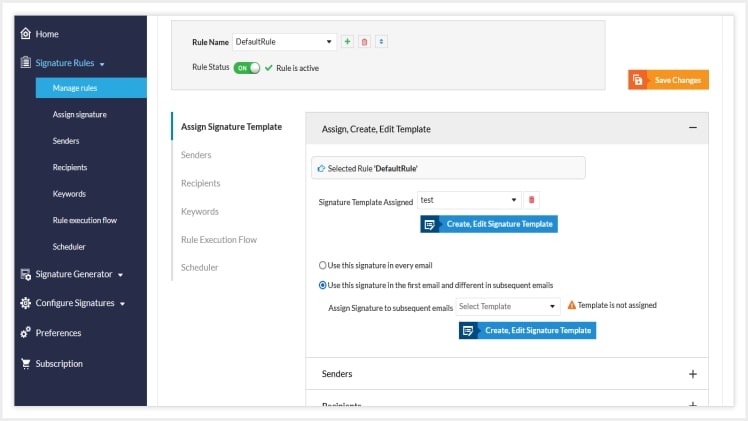
It is possible to add different signatures to the first and subsequent emails under Assign Signature Template, which we particularly liked when a user wanted to tone down the signature for back and forth conversations.
The Sender tab allows you to add or remove signatures for various senders, such as those in a Group or based on AD Filters. For example, if you want to add signatures to Senders based on their location, you can use the AD Filter to include/exclude them from the list. To include signatures to specific teams, you can create Office 365 groups.

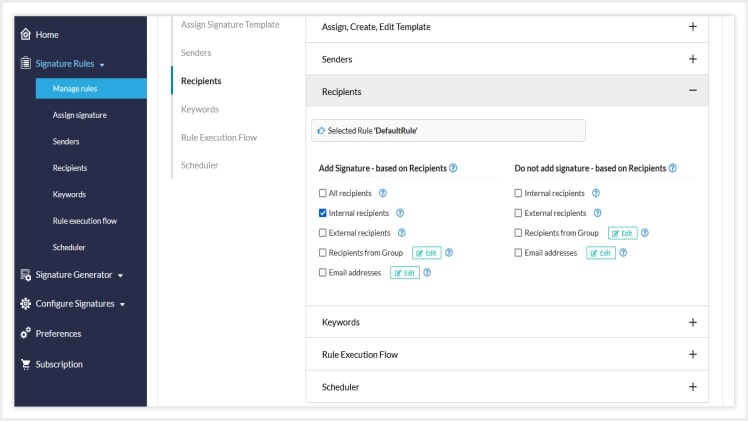
There are many more options for customizing sending signatures to different recipients under the Recipients tab. If you want to send a signature design only to internal recipients in your organization (for internal communication), select Internal recipients. It is possible to add a specific email address and a signature template to this rule, ensuring that only this recipient receives the specific signature. You can also choose not to include signatures for specific recipients. For example, if you frequently correspond with someone, you can remove this sender’s signature.
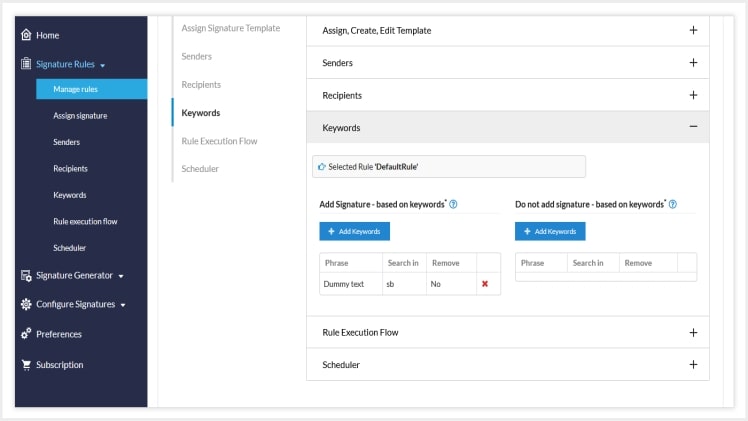
With the Keyword condition, you can add a signature based on specific words in the email. You can use this rule to remove the default signatures that are inserted by many smartphones and email clients, such as Sent from Outlook, Sent from Android, and so on. Experiment with different keywords such as Birthdays, Holidays, Christmas, Mega Sale, and so on.
The Rule Execution Flow determines the flow order and priority of the different rules. When a specific rule is executed, you can choose whether to stop processing the next rule or continue on to the next rule.
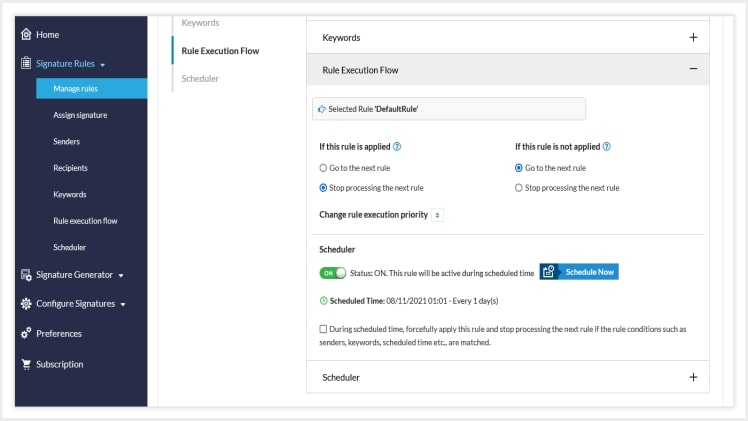
The Scheduler is an essential feature that allows you to include time-themed signature campaigns, promotions, or events in your emails. It runs for a set period of time and can be set to occur daily, monthly, weekly, or even at intervals. We liked this feature because it saves time when scheduling and managing signatures for multiple occasions and running targeted marketing campaigns.
e. Preferences
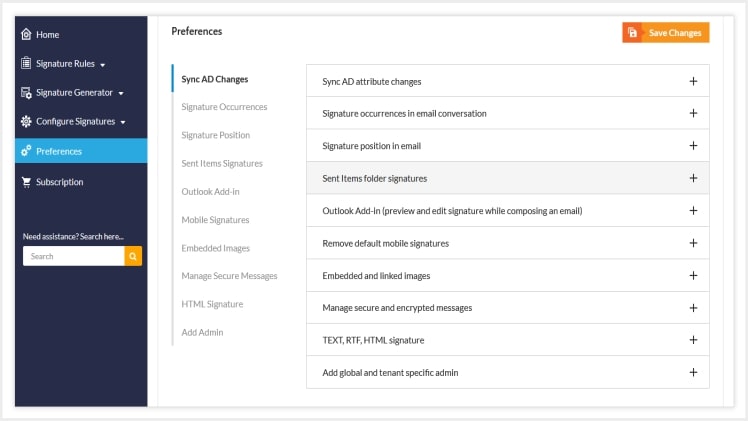
Sigsync Preferences are a collection of extra options or user-controlled features. If you have added new users or updated AD attributes for any users, you can Sync the AD attribute changes. In the signature occurrences, you can add signatures to every email, only the first email, or remove previous occurrences, and so on. This is especially useful if you are in constant conversation with the recipient and do not want the signature to take up the entire message space. Signatures can also be added at the bottom or top of an email chain, as well as in the Sent Items folder, for legal or other compliance purposes. You can also choose whether you want your signatures to have linked or embedded images with Sigsync to avoid downloading issues on the recipient’s end. If you’ve ever wondered how to add signatures to encrypted emails, Sigsync has a solution for you. Finally, you can force all emails to be in HTML format and enable global or tenant-specific admin. The Preferences section is a great time saver and comes in handy in a variety of customization scenarios. It is neatly presented in a drop-down format for easy viewing. The orange Save Changes button is also impossible to overlook, making the overall design very user-friendly.
f. User manual, FAQ and Knowledge Base
Sigsync’s extensive user manual guides, FAQ and Knowledge base articles are worth a mention. The guides are richly illustrated with screenshots, and the FAQ answers the majority of user questions on a variety of topics. The Knowledge base (KB) articles contain additional information such as various errors, their resolutions, and specific steps to specific questions. Setting up and using Sigsync is not difficult in our opinion, thanks to its extensive collection of articles and how-to guides.
Product Quality Score
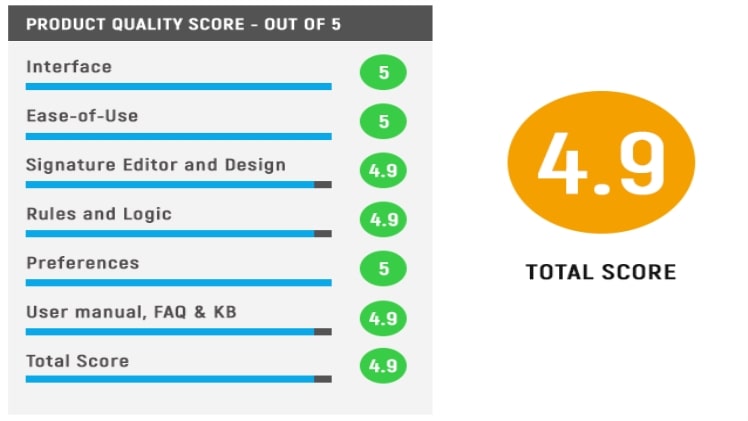
Main Features
We provide a high-level overview of the main features. Sigsync also includes a slew of other noteworthy features. We recommend that you go to their official website, explore it, and use it based on your needs..
- Centralized management with complete signature control
- Works on all platforms and offers portability
- Automatically retrieve and update AD field values
- 3 different signature modes to add signatures
- HTML signature with excellent signature template gallery
- Integrate social media buttons in your signature
- Scheduler to add signatures for different occasions
- Integrate Analytics and One-click surveys to get customer feedback
- Sigsync Outlook Add-in allows you to add signatures on-the-fly
- Signatures and Disclaimers in Sent Items ensure legal compliance.
- Sigsync is safe and secure with GDPR and HIPAA compliance
List of Benefits
- Cloud based email signature manager : With a cloud based signature, it is easy to access the service from any device without requiring installations.
- Centralized Office 365 signature : With Sigsync’s centralized signature, you can easily manage all of your signatures from a single dashboard. It is possible to designate a global administrator or a tenant-specific administrator. The dashboard lists all of the tenants, making it easy to manage signatures for all of them.
- Company-wide email signatures : Many organizations find it extremely difficult to add company-wide signatures using the native Microsoft email signature, a problem that Sigsync solves perfectly. You can have peace of mind with Sigsync because all signatures are uniform and have a consistent design across the entire organization. There is no need to update each user’s signature, and signature updates can be rolled out to all in minutes.
Technical Specifications
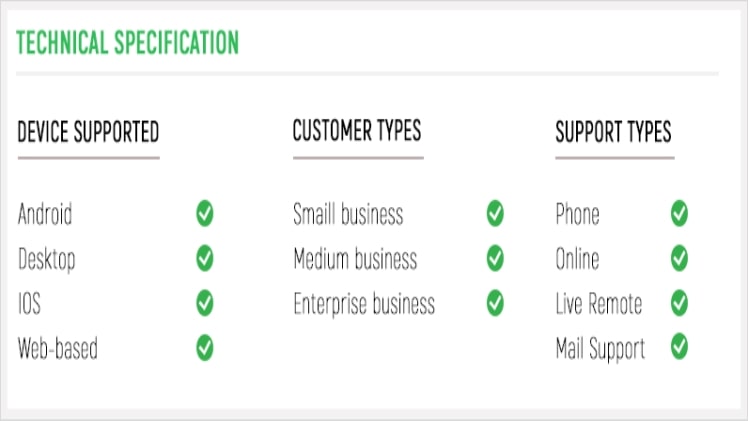
System Requirements
| Requirements | Specifications |
| Any desktop, smartphone, iOS or iMac device with a compatible web browser installed | Modern web browsers such as Google Chrome, Safari, Opera, Mozilla Firefox, Microsoft Edge |
| Licensed or Trial Microsoft Office 365 account | With Exchange online included |
| Sigsync Sigsync Outlook Addin for client side signatures | Supported versions:
Microsoft Outlook for Windows (with a Microsoft Office 365 subscription) Outlook 2016 (Build 14131.20360 or higher) Outlook 2019 (Build 13929.20296 or higher) Outlook Web Access (OWA) |
24/7 Customer Support and Free live demo
Sigsync offers free customer support 24 hours a day, seven days a week to help you with any email signature queries, issues, or questions you may have. You can reach them via their live chat window, which can be found in the bottom right corner of any screen. We were astounded by their prompt and personalized responses to our inquiries. We’d also like to point out that their expert technical team offers a free live walkthrough demonstration of the entire product upon request, so you can familiarize yourself with all features and specifications ahead of time. This also assists you in becoming familiar with the service. Simply fill out the contact form with your requirements, timezone, and preferred date and time, and they will get back to you. We were overall impressed by their support, which goes above and beyond to extend assistance as if it were a family.
Pricing Plans
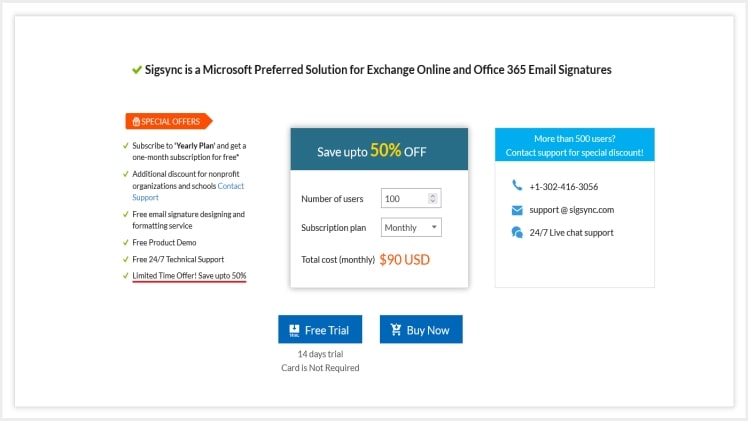
| Monthly | Yearly | |
| 100 Mailboxes | $100 | $990 (With one month of free subscription) |
| Flexible License Plans | Yes (Can change from monthly to yearly plan, downgrade or upgrade) | |
| Free Trial Available | Yes. 14 days free trial to try all the features | |
| Discount for Nonprofits, Schools and Government Organizations | Yes (Contact Support for more info) | |
| Discount for more than 500 users | Yes (Contact support for info) | |
| Payment Method | Credit or Debit Card. Sigsync is PCI compliant | |
| License Type | Based on the number of user mailboxes with no restrictions on the number of mails sent by each user | |
Security
When it comes to security, there is no reason to be concerned because Sigsync is a Microsoft-approved email signature service. As per Microsoft’s flow, it uses secure cloud services for signatures and disclaimers. The emails are neither read by anyone nor stored anywhere. The tenant login process is secure, as it employs Microsoft OAuth 2.0 and TLS encryption for authentication. Sigsync is also ISO 27001:2013 certified, and the email signature process is fully secure. Another feature of Sigsync is that it supports multi-factor authentication and that its servers are GDPR compliant. It is also worth noting that it is HIPAA compliant, emphasizing security.
Free Signature Design
If you’re having trouble getting signatures for your entire team or need quick signatures for specific occasions, we recommend using Sigsync’s free signature design service to get a custom design of your choice. This is an additional bonus feature that allows you to contact the Sigsync expert team with your signature requirements and have your template designed for free! This is one of the standout features that we couldn’t find in other signature solutions on the market.
Final Verdict
Sigsync is one of our favorite Office 365 signature software because of its feature-richness, versatility, unlimited customization options, free signature demo and signature design, and full-fledged signature editor with an impressive template gallery. The list of features is practically endless, and we loved how easy it was to use and how portable it was. Another aspect for which we would like to give it a five-star rating is its pricing plans. When compared to other signature solutions, Sigsync’s plans are pleasantly affordable for the plethora of features that it provides.
2022 Best Quality Paid Guest Post Website List
2daybusinessinfo.com
eblogsz.com
easybuzz.info
newsbuzz24.net
gotospurs.com
newsmags.net
newstimez.info
sportswebzone.com
sportstimez.info
webblog30.com
